📖 User Guide
This user Guide is updated regularly. It allows you to enter in the details to learn how to use the editor.
|
📄 View manual in PDF format Listen in voice mode :  ParticlesLast update : January 05, 2026🔗 AnimatedThis panel brings your particles to life — or makes them disappear. There is nothing complicated here, just a few parameters that can drastically change how your particle systems behave. ✨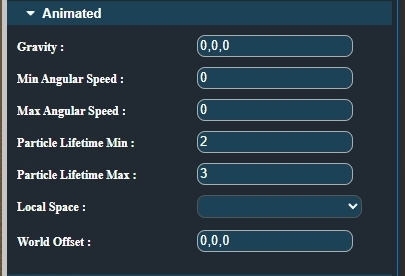
First, gravity. It defines whether your particles fall quickly, slowly, or not at all. Apply values on the X, Y, and Z axes. For example, if you want rain to fall, you could use values like -0.1, -5, 0. 🌧️ Next, Min and Max angular speed allow you to define a range of angular velocities, expressed in radians per second. Then, Particle lifetime (Min / Max) defines the lifespan range of particles, in seconds. ⏱️ After that, you can choose whether particles are emitted in local or world space. If the emitter is a mesh and you configure it as local, all particles will be generated in the mesh’s local space. This means that any rotation or transformation applied to the mesh will also affect the entire particle system. 🔄 If the emitting object rotates, the particles will rotate as well. Next comes the World Offset. This option is generally less useful and simply applies a positional offset to the particle system. Leave it at 0, 0, 0 if no offset is needed. 📍 That’s all for this panel. You now have one last panel to explore: Noise. |