📖 User Guide
This user Guide is updated regularly. It allows you to enter in the details to learn how to use the editor.
|
📄 View manual in PDF format Listen in voice mode :  ParticlesLast update: January 05, 2026🔗 NoiseThis panel allows you to use noise textures to disturb the position or direction of particles.The noise textures are fully procedural — no external texture is required. Here is what the panel looks like: 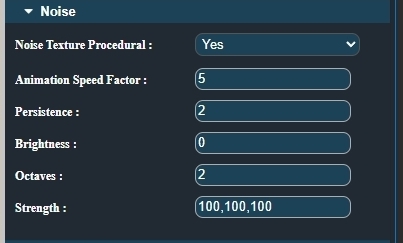
Simply choose whether you want to enable noise by selecting Yes in the dropdown menu. The Speed Factor controls how fast the noise evolves over time, while the Strength defines how strongly it affects the particles. You can then adjust Persistence, Brightness, and Octaves. The default values are usually a good starting point, but feel free to tweak them one by one to see the results. Experimentation is highly recommended here 🔍 This panel is entirely optional, but it can add subtle or chaotic motion that makes your effects feel more alive. |