📖 User Guide
This user Guide is updated regularly. It allows you to enter in the details to learn how to use the editor.
|
📄 View manual in PDF format Listen in voice mode :  ParticlesLast update : January 05, 2026🔗 ShapeThis panel is particularly interesting because it allows your particle systems to take a specific shape. In other words, it defines the particle emission region.Your particle systems can take the form of a sphere, a box, a cylinder, or a cone… The choice is yours. 🔺⬛⚪ 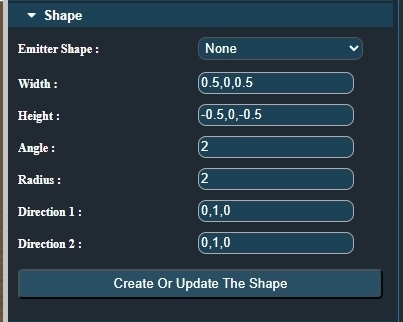
To use this panel, select the shape you want from the dropdown menu and configure its properties, such as size or diameter. Once everything is set, click the "Create Or Update The Shape" button. This will either create the shape or update it if one already exists. Each modification made in this panel must be validated using this button to take effect. ✅ At this stage, you should start seeing interesting particle systems. However, you can push them further by adding more dynamics, such as lifetime and gravity. 🌪️ We will cover this in the next chapter. |