📖 User Guide
This user Guide is updated regularly. It allows you to enter in the details to learn how to use the editor.
|
📄 View manual in PDF format Listen in voice mode :  ParticlesLast update : January 05, 2026🔗 VelocityThis panel should be opened after configuring the base settings of your particles: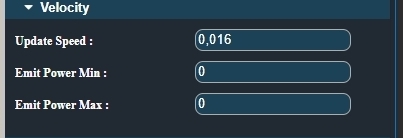
This panel allows you to give speed to your particles using the Update speed value. (Use values between 0.000 and 1.000.) 🚀 Next come Min power and Max power: A particle’s speed is determined by the power applied to it when it is emitted. The higher the power, the faster the particle moves. The emission power, and therefore the particle speed, can vary randomly within the defined range. 🎯 Let’s go further by exploring Shapes, which constrain particles to follow a specific form. |